
-
Hi everyone! We’ve just released Chrome Beta 156 (156.0.8078.39) for Android. It’s now available on Google Play.You can see a partial list of the changes in the Git log. For details on new features, check out the Chromium blog, and for details on web platform updates, check here.
-

There’s growing talk of digital sovereignty as enterprises rethink past consolidation decisions made in the name of simplicity. Mozilla, developer of Firefox, argues that a “very specific, very important layer” has been mostly missing from that conversation: The browser.
-
Hi, everyone! We’ve just released Chrome 155 (155.0.8059.79) for Android. It’ll become available on Google Play over the next few days. This release includes stability and performance improvements. You can see a full list of the changes in the Git log.
-
The Beta channel is being updated to OS version 16836.15.0 (Browser version 156.0.8078.31) for most ChromeOS devices.
-

Google is rolling out a massive wave of updates to the Google Play Store today, and the headline feature completely changes how everyday users can build and run software on their devices.
-
The Stable channel has been updated to 155.0.8059.79/.80 for Windows and Mac and 155.0.8059.79 to Linux which will roll out over the coming days/weeks.
-
Google is rolling out its flagship Gemini 4 Argon model to millions more subscribers today
 Issue 2026-42
Earlier this month, Google pulled back the curtain on its newest primary AI model, Gemini 4 Argon, highlighting how it is actively being deployed to refactor Chromium and supercharge complex agentic workflows.
-
The Extended Stable channel has been updated to 152.0.7977.167 for Windows and Mac which will roll out over the coming days/weeks. Security FixesNote: Access to bug details and links may be kept restricted until a majority of users are updated with a fix.
-
Welcome back to The CSS Podcast! Una and Bramus dive into CSS anchor positioning, a powerful new API that revolutionizes how developers handle dynamic UI element placement. Learn how to create interactive tooltips, popovers, and menus directly in CSS, eliminating the need for complex JavaScript.
-
Hi everyone! We’ve just released Chrome Stable 156 (156.0.8078.33) for iOS; it’ll become available on App Store in the next few hours.This release includes stability and performance improvements. You can see a full list of the changes in the Git log.
-
Gemini 4 Argon available on Google Cloud, built to help solve your business’ hardest problems
 Issue 2026-42
Last week we announced that Gemini Enterprise has evolved to make it even simpler to get work done, and introduced the Gemini agent, your new universal agent for work. It’s always on and ready to answer your questions.
-
Modern Web Guidance helps agents use built-in browser capabilities instead of writing repetitive boilerplate code. With Modern Web Guidance installed, the coding agent generates declarative dialogs with less JavaScript while adding invoker commands for safe dismissals and helps support compatibility across browsers.
-

Google showing the wrong language or country? Change Display language and Results region, check your VPN and account settings, and fix it for good.
-
Over the years, ChromeOS quietly built one of the best, most fluid window management setups of any operating system.
-
If you have spent any time digging through the app drawer on your new Googlebook, you have likely already spotted the pre-installed Linux Terminal.
-
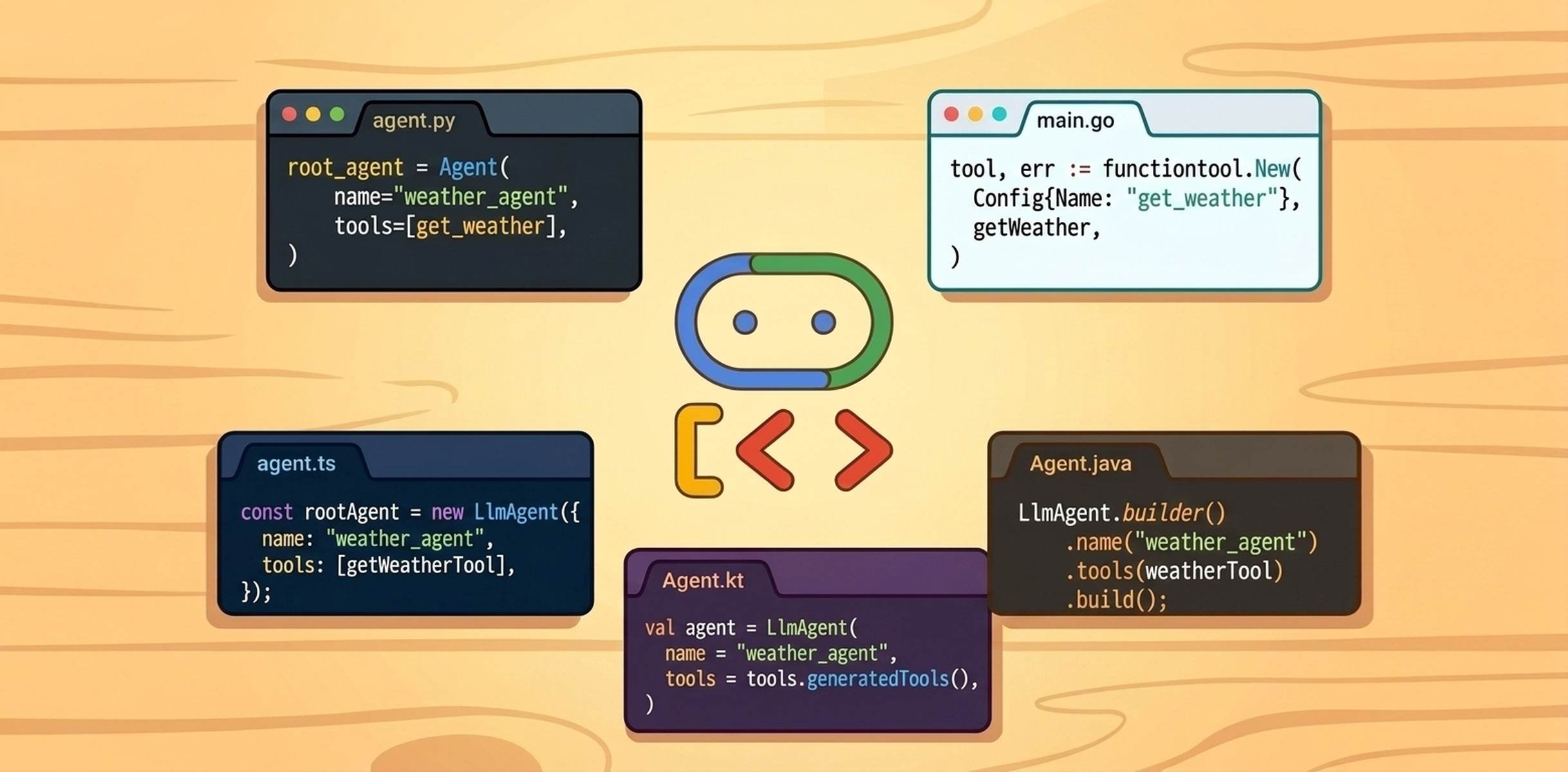
When we talk about agents, that doesn’t necessarily mean we’re talking about Python. In today’s modern ecosystem, an agent might run as a high-concurrency Go microservice on Cloud Run, or live inside a browser tab calling Chrome’s on-device model. Yet many agent frameworks assume a Python-only stack.
-

NET::ERR_CERT_AUTHORITY_INVALID means Chrome does not trust who signed the site’s certificate. Find out which cause is yours and fix it.
-

Learn how to use the new Resend feature in the Chrome DevTools Network panel. Now that Replay XHR is officially retired, this update allows you to instantly refire requests while preserving headers, cookies, and payloads.
-
As a business intelligence user, this probably sounds familiar: Most dashboards only provide you with a standardized canvas and a fixed library of charts, and the “analysis” consists of a CSV export that takes you to another system.
-
Just last week, we reported on a glaring omission during the launch of the Googlebook platform: the highly anticipated “Better Together” sync features simply refused to work with recent Samsung Galaxy devices.
-
Earlier this week, we talked about the frustrating reality that several major Android games (like Call of Duty: Mobile) are currently blocked from installing on Googlebooks via the Play Store.
-
If you are coming to Googlebook OS from a Chromebook, one of the first things you will notice is that your muscle memory might need a slight adjustment.
-

Play free Google games right in Search: Snake, Pac-Man, Solitaire, Minesweeper, Doodle games and the Chrome dino. Here’s exactly what to type.
-
The Stable channel is being updated to OS version 16805.33.0 (Browser version 154.0.8037.151) for most ChromeOS devices.
-
Logitech brings its powerful Options+ software to Googlebook with dedicated Gemini features
Issue 2026-41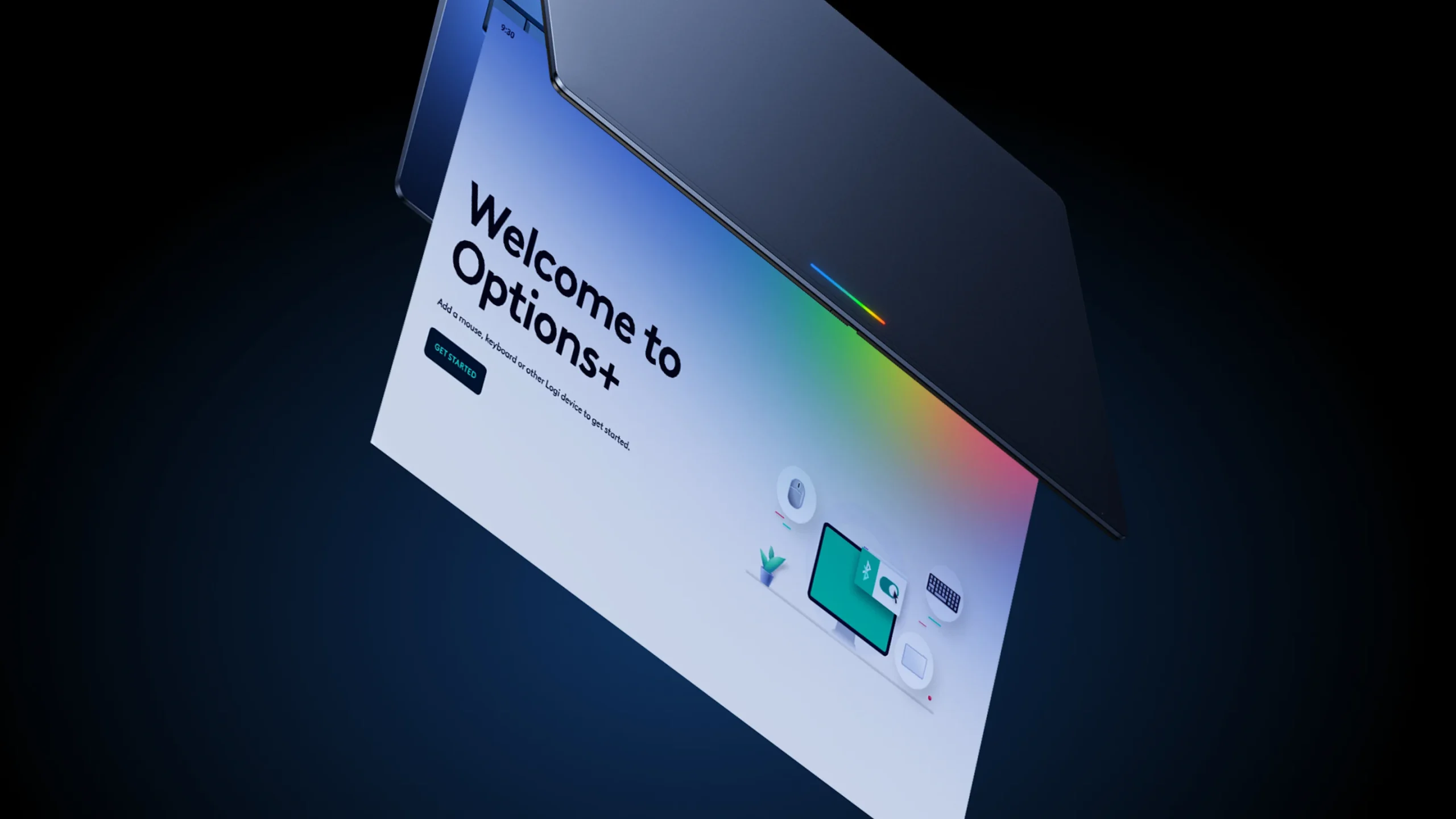
When you think about premium third-party accessories for your laptop, Logitech is almost always the first name that comes to mind.
-
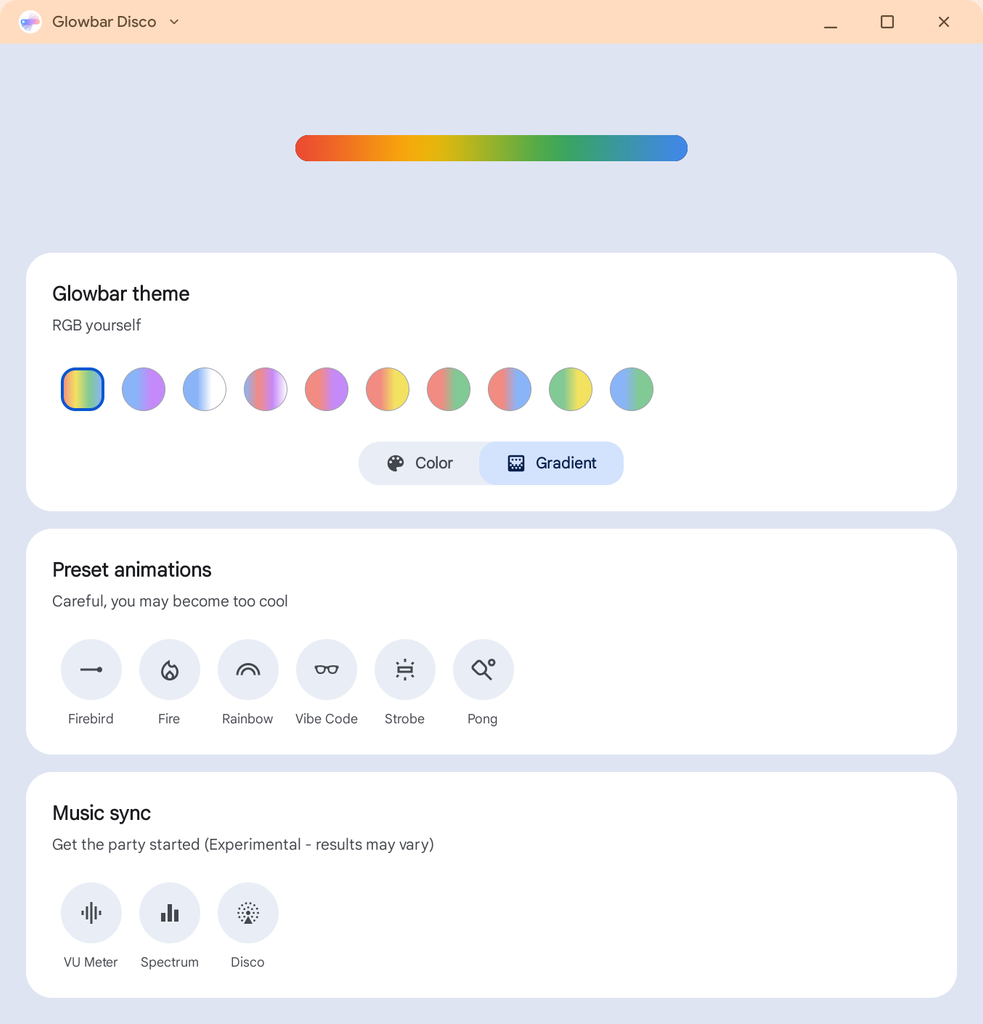
When Google introduced Googlebook OS, the sleek, illuminated Glowbar on the lid of these laptops immediately stood out as a signature hardware feature. While it serves as a functional status indicator, it turns out Google’s engineers couldn’t resist having a little fun with it.
-
Hi everyone! We’ve just released Chrome Dev 157 (157.0.8092.0) for Android. It’s now available on Google Play.You can see a partial list of the changes in the Git log. For details on new features, check out the Chromium blog, and for details on web platform updates, check here.
-
Unboxing the Lenovo Googlebook 15: A gorgeous 15-inch debut for Google’s new OS [VIDEO]
Issue 2026-41All five Googlebook models have officially arrived in the studio, and to kick this first wave of unboxing videos off, we decided to start with the largest of the batch: the Lenovo Googlebook 15.
-
The Dev channel has been updated to 157.0.8092.0 for Windows, Mac and Linux.A partial list of changes is available in the Git log. Interested in switching release channels? Find out how. If you find a new issue, please let us know by filing a bug.
-

Gemini in Chrome can summarize pages, compare tabs, edit images, run saved prompts, and handle tasks with auto browse. Here’s what each feature does.
-
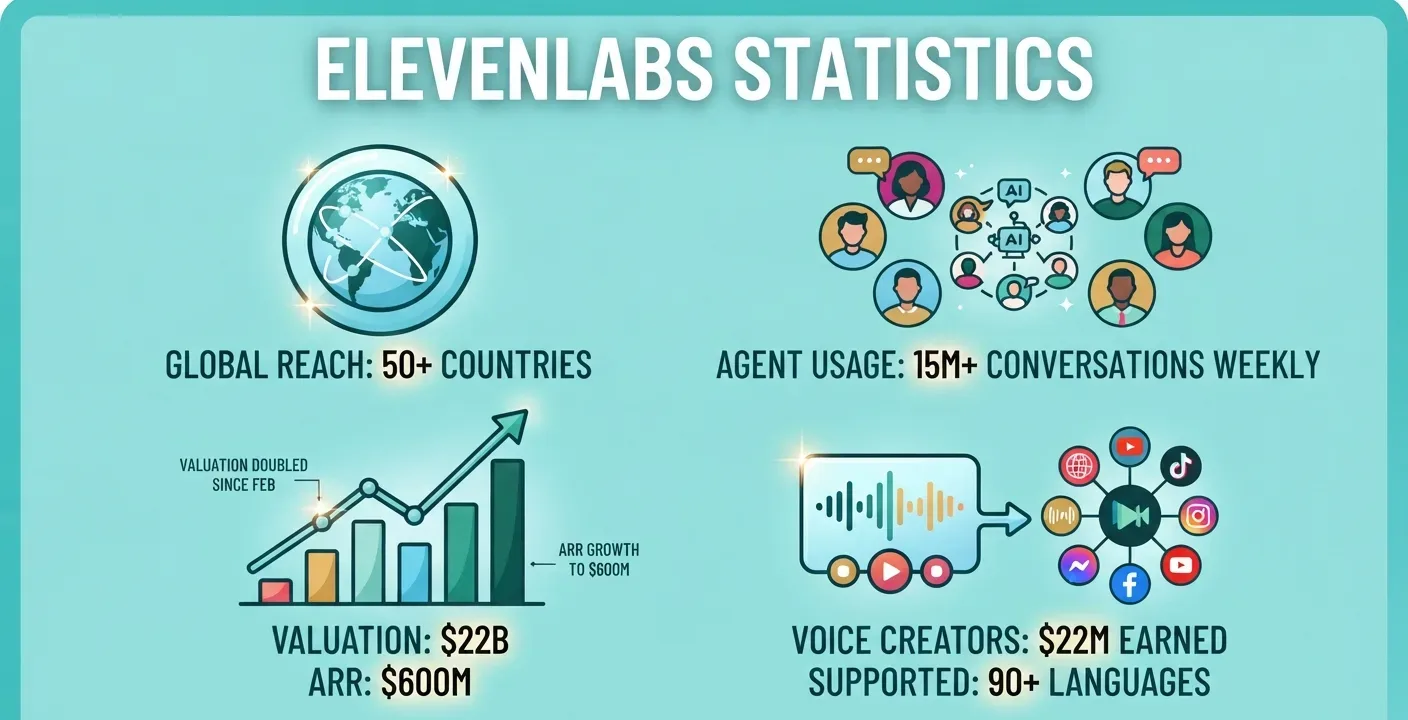
ElevenLabs reached a $22 billion valuation after announcing a $300 million employee tender on September 30, 2026. Explore its latest valuation, employee share sale, and growth since its February Series D round.
-

Google seems to be making a strategic play to control the AI infrastructure layer, not just roll out another shiny new agent.
-
With the launch of Googlebook, there is a massive new operating system to explore and a lot of new software behaviors to learn.
-
Jumping into a brand-new operating system on launch day is always an adventure. While the hardware on these initial Googlebooks is phenomenal, the software (and my ability to properly navigate it) is inevitably going to have some growing pains both.
-

Editor’s note: This article is adapted from Thomas Kurian’s keynote address at Gemini at Work 2026. It includes a number of announcements: Gemini, a single, universal agent for work that answers your questions, handles your knowledge work, creates your images and media, and writes and runs code.




Welcome to the ChromeOSphere
Your one-stop hub for all things Chrome OS and Chrome browser. Our mission is simple: to keep you connected with the pulse of this ever-evolving digital realm. From the latest updates on Chrome, ChromeOSphere brings together the diverse voices of the Chrome world.